
Listen to The VRverse Podcast

Advertisement

Review: bHatpics TactSuit Air
- August 20, 2025
- 10:34 am
Recently, I had the opportunity to review the TactSuit Pro included in the FPS bundle, which piqued my curiosity about how the TactSuit Air stacks up. This interest stemmed from the changes that have been implemented, allowing bHaptics to provide a more budget-friendly option for individuals who may have the means for the Pro version but still wish to enhance their virtual reality experience with additional haptics.

Product Details
Brand: bHaptics
Price: US $249
Reviewed On: PCVR / Meta Quest / PSVR2
* Product Provided For Review *
What’s In The Box?
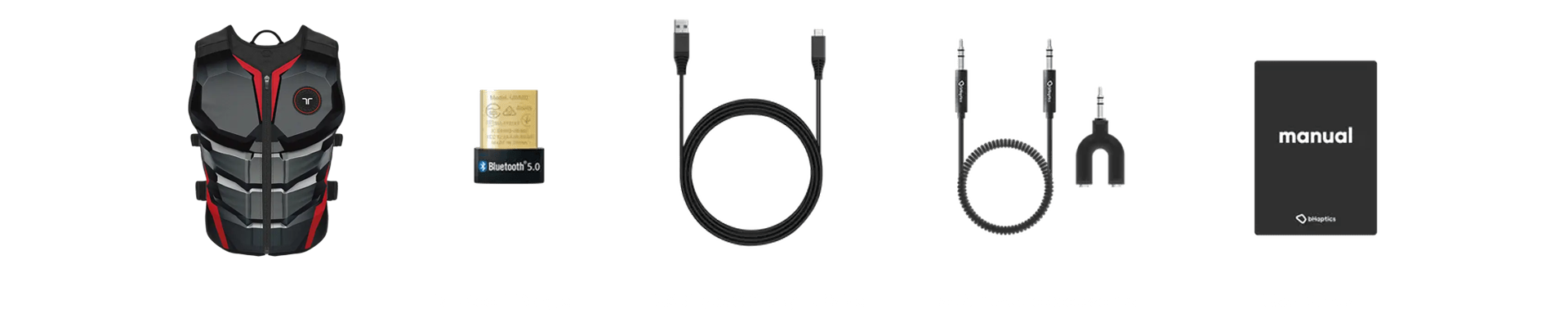
Inside the box, you will find the TactSuit Air, a Bluetooth dongle, a USB Type C charging cable, TactSuit audio accessories, a user manual, and a sheet of bHaptics stickers.
Quality and Comfort
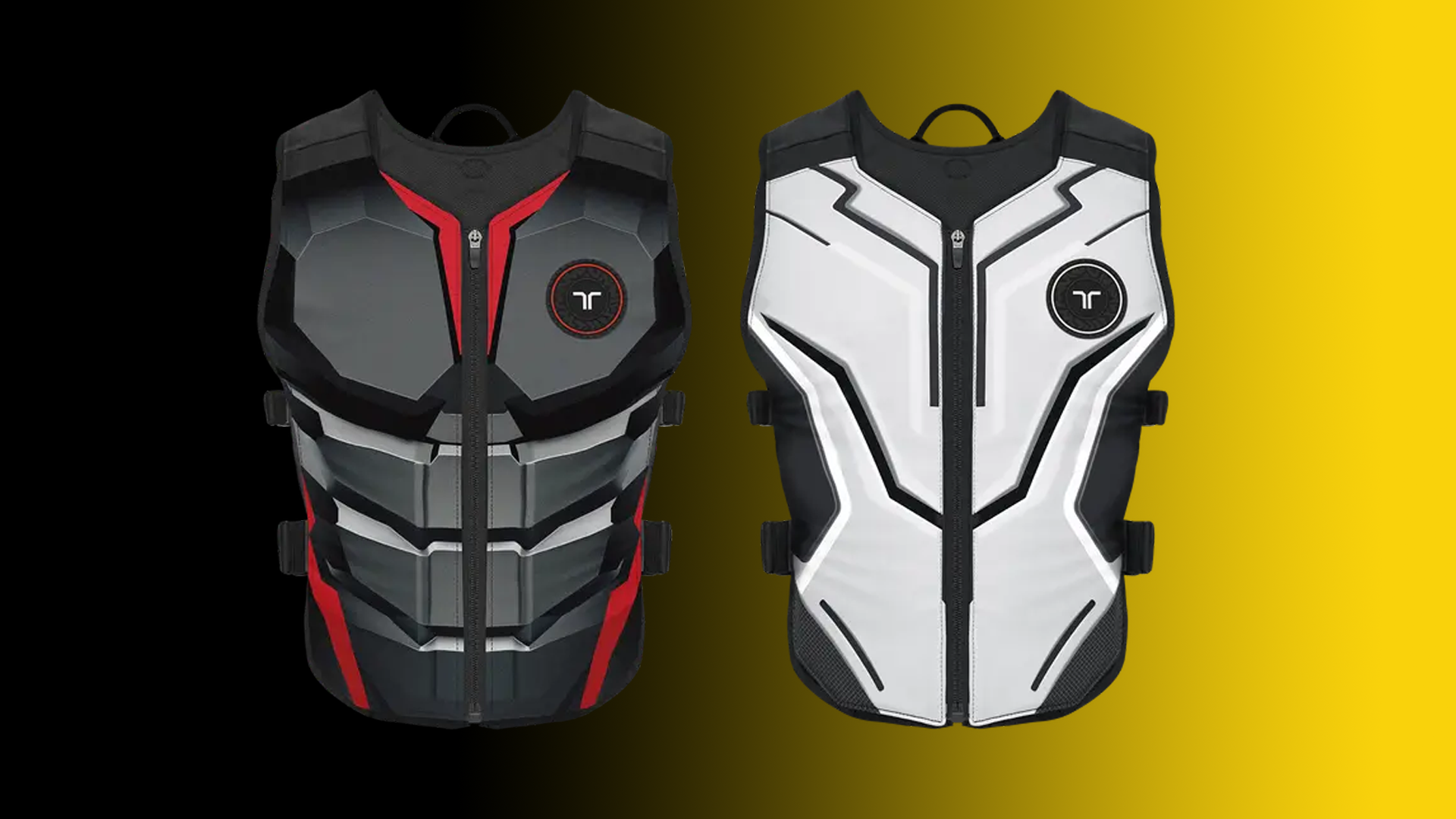
One aspect where I have consistently found bHaptics to excel is in the quality of their products. However, I was curious if they had to implement any changes to accommodate the $249 price point. I’m pleased to share that while some modifications have been made, the materials remain top-notch, and the vest’s construction still feels robust and well-crafted.
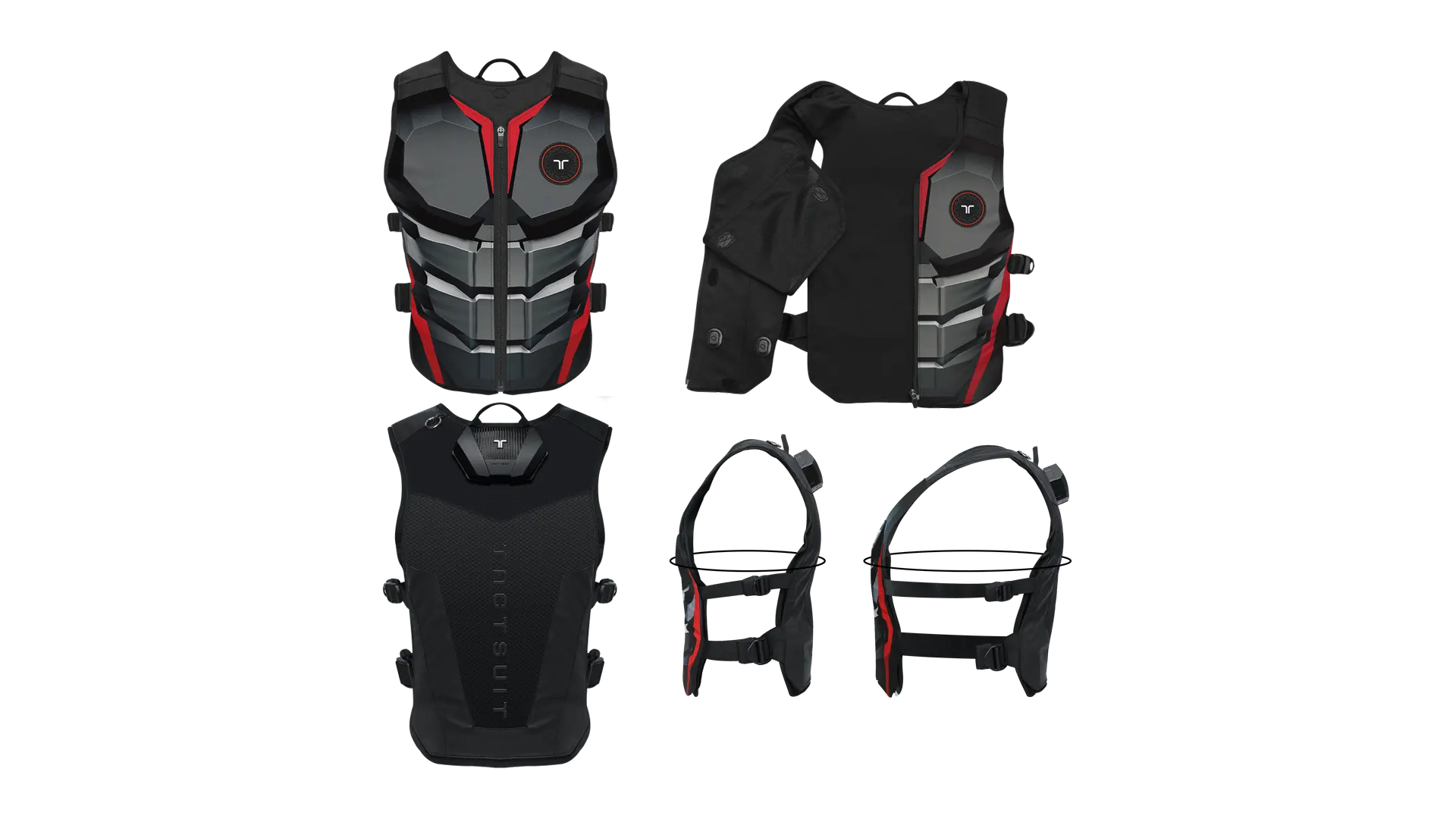
The TactSuit Air differs from the Pro model in that it is made entirely of fabric, lacking the rubber front and adjustable shoulder size found in the Pro. While the rubber front of the Pro adds sturdiness, I have experienced no problems with the TactSuit Air and its comfort during wear. The quality of the materials, the ERM motors and plastic, is excellent, giving the impression that it is designed for long-lasting use. The vest features two adjustable straps on each side, allowing you to customize the fit to your body shape—within a range of twenty-four to fifty inches. Additionally, it has a front zip for fastening, which means once you find your ideal fit, you can easily remove it without readjusting the straps, making it simply a matter of putting it on and zipping up for your next session.
The TactSuit Air is equipped with sixteen ERM motors—eight positioned at the front and eight at the back—ensuring a balanced distribution for optimal haptics and weight. This design keeps the vest comfortable and lightweight during wear, as the weight is evenly spread across you
Immersion and Benefit
A crucial aspect of virtual reality is the tactile feedback provided by haptics. bHaptics acknowledged this early on in the VR landscape, allowing them to refine their expertise in this field and appreciate the enhanced immersion it adds to gaming.
Having established a long-standing presence in virtual reality through their haptics technology, they have successfully created an impressive library of over two hundred and seventy (+) supported games across PC VR, Meta Quest, and PlayStation VR2. Among these, PC VR offers the widest range of support, followed closely by Meta Quest, while they are gradually expanding their game library on PSVR2. Each of these titles is crafted to utilise the haptic motors in the vest effectively, enhancing the immersive experience of the games. For instance, in a shooter game, the motors activate in the specific area of the body where you are hit, and in rhythm games, the vest’s haptics typically pulse in sync with the music or signal when you hit a note.
Although the TactSuit Air contains only half the number of ERM motors compared to the TactSuit Pro, the main difference I observed was in the shooters. The Pro’s additional sixteen ERM motors allow for more precise damage feedback, yet the TactSuit Air still provided a sufficiently accurate and immersive experience. Aside from this minor difference, I found that the TactSuit Air did not compromise on immersion.
Alongside the games that are either natively supported or modified (for PC VR only), the vest includes an Audio to Haptics feature. This allows audio to be converted into haptic feedback throughout the entire vest. To enhance the effectiveness of this feature, you might need to tweak certain settings in the games or within the bHaptics desktop or mobile app.
Advertisement

Advertisement
Testing The bHaptics FPS Bundle
For my review, I tested the vest across a range of games that are natively supported on all compatible platforms, examined the Audio to Haptics feature on each platform, and also tried out several mods on PC VR. To ensure a thorough perspective, I avoided playing the same game on different platforms.
Steam VR
Steam VR was the ideal platform to begin testing, as it offers the widest range of supported titles, featuring two-hundred and twenty-five games with both native and mod support. For my PC VR testing, I utilized Steam VR exclusively, even though there are a few games that are natively available on the Meta PC Store.
Set-Up
Setting up PCVR is quite simple. First, you need to download and install the bHaptics Player on your PC. Upon launching the player, it will guide you through the process of pairing your devices with it, which is done through a Bluetooth connection – you can either use the internal Bluetooth (if your PC is equipped with it) or connect the provided dongle. After everything is successfully paired, you are all set to begin.
Native
For the titles that are natively supported on PC VR, I had a broad range to choose from. I aimed to explore various types of games, so I selected Arizona Sunshine Remake, Hubris, Audio Trip, Onward, Paint The Town Red, and Propagation Paradise Hotel. Each game offered robust support, but Hubris and Propagation Paradise Hotel stood out to me the most. The developers of Hubris designed the vest to signal when you take damage, deliver a recoil sensation with a gentle pulse when firing your weapon, buzz if you fall from a height, create a buzzing feeling when adding items to your inventory, and provide a vibration pattern on the vest while swimming, mimicking the sensation of water flowing down your body. Although Propagation Paradise Hotel is less sophisticated, it features a light haptic buzz when picking up items and opening doors, a heartbeat to alert you when your character’s health is low, and a strong vibration when you sustain damage from a zombie, which significantly enhances the horror atmosphere of the game. Regarding Arizona Sunshine, the vest provides a slight recoil pulse when you shoot your gun and indicates when you are taking damage and the location of the attack. This was also true for Onward, where the haptics are more generalised to the area you are hit in—unlike the previously mentioned extra ERM motors in the Pro that allow for a more precise simulation of the point of contact. Paint The Town Red was utilised simply to indicate where you are struck, while Audio Trip employed the vest to signal when you hit notes and when you failed to dodge a wall, rather than syncing with the music’s beat.
Mods
With PC VR supporting mods, even for certain games modded for VR, it was only logical to explore some of these modifications. I decided to test Half-Life: Alyx, Resident Evil VII, Far Cry VR, Compound, and Beat Saber. The mod for Alyx is exceptionally well-designed, featuring effects for being hit and firing your weapon. The haptics effectively mimic the action of retrieving and placing objects over your shoulder, and the pattern that appears on the vest during healing is the most impressive I’ve seen in any game. Another standout moment was playing Resident Evil VII with the haptics turned on; this intensified the already frightening game, making it feel even more immersive, especially regarding the damage taken and the sensation of firing weapons – it truly enhances the experience. In Far Cry VR, the mod added sensations for firing guns and taking damage. For Compound, it provides positional feedback for where you’re being hit, along with lighter haptics for shooting and picking up objects. In Beat Saber, it introduces haptics on the side where you’re slicing the blocks, creating the sensation of the saber moving on that side.
Audio To Haptics
For Audio to Haptics, I tested the vest with Le Mans Ultimate, Alien Rogue Incursion, Lone Echo, Spin Rhythm XD, and Halo VR. Let’s begin with Le Mans Ultimate, as this is where the Audio to Haptics truly excels. The vibrations coursing through the vest mimic the roar of these supercars as you drive them, intensifying as you navigate the edges of the track, spin out, or crash. Combining this with a steering wheel significantly enhances the immersion. In rhythm games, it effectively captures the pulse and beat of the music. Lone Echo offers an incredible sensation when navigating through its world, yet the extensive dialogue causes the vest to vibrate continuously – ultimately diminishing this immersive experience. When playing Alien, there’s a persistent environmental hum transmitted through the vest, and I found it necessary to adjust some audio settings in the game to make it feel somewhat acceptable. The same goes for Halo VR; you really need to tweak the audio settings or the levels in the bHaptics player. It’s all about fine-tuning the settings to achieve a satisfying experience, although it will always fall short of perfection.

Advertisement

Advertisement
Meta Quest 3
Next, I conducted my tests on the Meta Quest 3, which offers a significantly larger selection of natively supported titles compared to the PSVR2, currently featuring native support for one-hundred and twenty-eight games.
Set-Up
Once more, the setup is quite simple. First, download the bHaptics Player App from the Meta Quest Store. Next, connect the vest through the Bluetooth settings on the Quest. Launch the bHaptics Player App, and it will show that the devices are successfully paired. You are now all set to enjoy games that are natively supported.
Native
For the Meta Quest’s natively supported games, I explored Sniper Elite: Winter Warrior, Espire 2, Smash Drums, The Phoenix Gene, and ARK and ADE. Once again, the native integration in these titles greatly enhances the immersive experience. Sniper Elite delivers the expected shooting and damage mechanics typical of shooter games, also providing the sensation of placing and removing the gun from over your shoulder. Espire 2 effectively utilises this feature to create a light recoil effect when shooting your gun, more heavy vibrations when taking damage, along with a healing pulse pattern for recovery. Smash Drums employs directional haptics to simulate the feeling of striking the drums, offering a subtle pulse for impact rather than focusing solely on the music. ARK and ADE incorporate this technology to mimic recoil and damage taken, which are standard features in gun-centric games. Lastly, The Phoenix Gene truly impressed me, as it simulates the act of shooting fireballs, reacts when you take damage or hit objects in the environment, and responds to various elements and sounds around you, such as parts of buildings collapsing.
Audio To Haptics
To activate the Audio to Haptics mode on your Meta Quest, you must utilise the TactSuit audio accessories that are included. First, connect the splitter to the audio jack on your Quest. Then, plug in your headphones into one of the splitter’s ports, and from the other port, connect one end the provided cable and the other end to the back of the vest.
After testing with the Pro, I knewI needed to revisit Iron Man for the TactSuit Air. With just a few minor tweaks to the audio levels, it feels fantastic; even with Haptics to Audio, it quickly becomes deeply immersive as the sensations of the thrusters vibrate through the vest. Since the game’s volume adjusts based on the thrusters’ proximity to your body, moving them closer amplifies the haptic feedback, significantly enhancing the immersive experience. This was also true for Starship Troopers: Continuum; by completely turning off the music, the sounds of gunfire, enemy screams, and the world’s rumbles come alive, providing a gratifying haptic experience. Pistol Whip effectively simulates the pulse and rhythm of the music, which is typical for Audio to Haptics in rhythm games. Next, I decided to dive into some horror games that effectively use atmosphere to create tension, so I played Lies Beneath and Paranormal Activity: The Lost Soul. Between the two, Paranormal Activity excelled with the eerie hum of the house, the constant heartbeat that simulates fear pulsing in the vest, and the various noises and bangs that add an extra jump scare factor. Lies Beneath, while still decent, became overwhelming with its multitude of sounds, which detracted from the ambiance and overall experience.

Advertisement
Advertisement
PlayStation VR2
Last but not least, we have the PlayStation VR2, which, despite being the newest addition, already boasts a modest line-up of eighteen games that are natively supported. I’m also hopeful that some of the cross-platform titles that currently have support will eventually be available for the PSVR2 as well.
Set-Up
To set up, simply install the bHaptics Player for Mobile on your smartphone. Open the bHaptics Player and pair your vest. Ensure your mobile device and PS5 are connected to the same Wi-Fi network. Launch the games that are natively supported, then tap the Start Button in the bHaptics Player on your phone to confirm the connection.
There is one concern regarding the PSVR2’s connection method, as it relies on WiFi instead of Bluetooth. This can lead to a minor delay in feedback on native games. While it’s often not very noticeable, there are moments when it becomes quite apparent. I wish Sony would allow the PS5 Bluetooth to be more compatible with other devices, as this would negate this problem.
Native
Currently, the number of supported games is limited, which meant I could only test those I already owned on PlayStation VR2. The titles I tried included Zombie Army VR, UNDERDOGS, Master of Light, Synth Riders, and Epic Roller Coasters. Zombie Army VR stood out with its impressive bHaptics integration for shooting games, offering the sensation of placing and retrieving items from over my shoulders, along with a distinct feel for each weapon. In Master of Light, the vest vibrates when you take damage, but this didn’t enhance my engagement with the game – possibly due to my disinterest in the gameplay or the game itself. Synth Riders utilises the vest to register hits on incoming orbs, creating the sensation that the music’s beat resonates through the vest, and it also vibrates if you fail to dodge incoming walls. UNDERDOGS delivers an incredible experience, focusing on the sensations of collisions and damage through the vest – which is all it needs to succeed, and with the added headset haptics, you feel fully immersed in the mech. Lastly, Epic Roller Coasters pleasantly surprised me with its superb haptics that mimic the vibrations of the cart on the tracks. When engaging with the shooting mode, the subtle haptics create the sensation of firing the guns, and I was amazed at how much extra immersion can be added to a roller coaster game with just a few simple extra features.
Audio To Haptics
The Audio to Haptics feature on the PlayStation VR2 operates the same to that of the Meta Quest.
With my experience with a game when testing the Pro, I knew there was a couple games I have to experience again with the Audio to Haptics on the PlayStation VR2. Firstly, I went back into Madison VR. This game is undoubtedly the scariest horror experience I’ve ever encountered, primarily due to its chilling atmosphere and unsettling sounds that play tricks on your mind. The addition of haptics through Audio to Haptics enhanced the horror element significantly. Even though I had previously played it, the sense of unease was still palpable, and the haptics only intensified that feeling. Then I had to go back into their best exclusive title, Synapse. This game also thrives on its atmospheric tension, combined with intense action and telekinesis. The integration of Audio to Haptics worked seamlessly here as well, allowing me to feel the vibrations in the vest while using telekinesis, all without any adjustments to the game’s volume. With how well Moss worked when testing the Pro I wanted to give another third person game a chance and chose Max Mustard. This again worked very well without any adjustments being needed, for this I wanted to test a more laid back level, one of the music based levels and a boss fight, and the all worked well – although the music level was the best experience. I also revisited Tetris Effect, this has one of if not the best soundtrack in any game available, as with rhythm games this just takes the pulse and beat of the music and translates it into haptics – if you have or get a bHaptics vest this is an experience you must try, you will never play it without the additional haptics again. Finally, I went into Crossfire: Sierra Squad, where I found once I had turned the music setting low it gave an adequate result, which will give haptics for each step of your heavy footed character, feel damage and shooting your weapons – with the punchy weapon sounds in the game it feels great and you get different strength vibrations for different guns.
Verdict
The bHaptcs TactSuit Air has genuinely impressed me. Initially, I was concerned that reducing the number of ERM motors to sixteen (eight in the front and eight in the back) would lessen the immersive experience. However, after extensive testing, I discovered that the only significant difference appeared in shooter games, and even then, it was a minor issue regarding positional haptics. This is because the TactSuit Air simulates damage in the general area where you’re hit, while the thirty-two ERM motors in the Pro model provide more precise feedback. Aside from this, the TactSuit Air performed admirably when compared to the Pro version. As a leader in haptic technology, bHaptics has built an impressive library of supported games, whether natively or through mods (PC VR only). Even though it has only recently begun supporting PSVR2, they are already developing a respectable collection of compatible games for that platform. Although the TactSuit Air has undergone some design modifications to keep costs manageable, the materials used are of high quality, feel durable, and like it is built to last. Moreover, if you’re willing to experiment, the Audio to Haptics feature can be utilised across all platforms. While it may not be flawless, it still provides immersive advantages. The bHaptics team clearly recognises the benefits that haptics bring to virtual reality and the necessity of offering a more affordable option for those seeking enhanced haptics and immersion without the budget for the Pro model. Priced at $249 (USD), the TactSuit Air is a robust haptic vest that delivers a similar experience to the pricier Pro model ($499) at half the cost. If you’re aiming to enhance your VR gaming experience and immersion, the TactSuit Air is an excellent choice that achieves this effectively.
Copyright / Virtual Grip (formally The VR Realm) / 2016 -
