
Listen to The VRverse Podcast

Advertisement

DPVR G1 Smart Glasses Review—Solid Budget Smart Glasses With Some Trade-Offs
- March 6, 2026
- 1:32 pm
For some time, I’ve been exploring wearable technology, and when DPVR introduced their G1 glasses, I was eager to discover what they could provide, especially since their more budget-friendly display port PC VR headset (DPVR E4) was my go-to device for quite a while. They aimed to adopt a similar strategy with their G1 Smart Glasses, creating a more cost-effective alternative compared to other options available in the market.
What’s In The Box
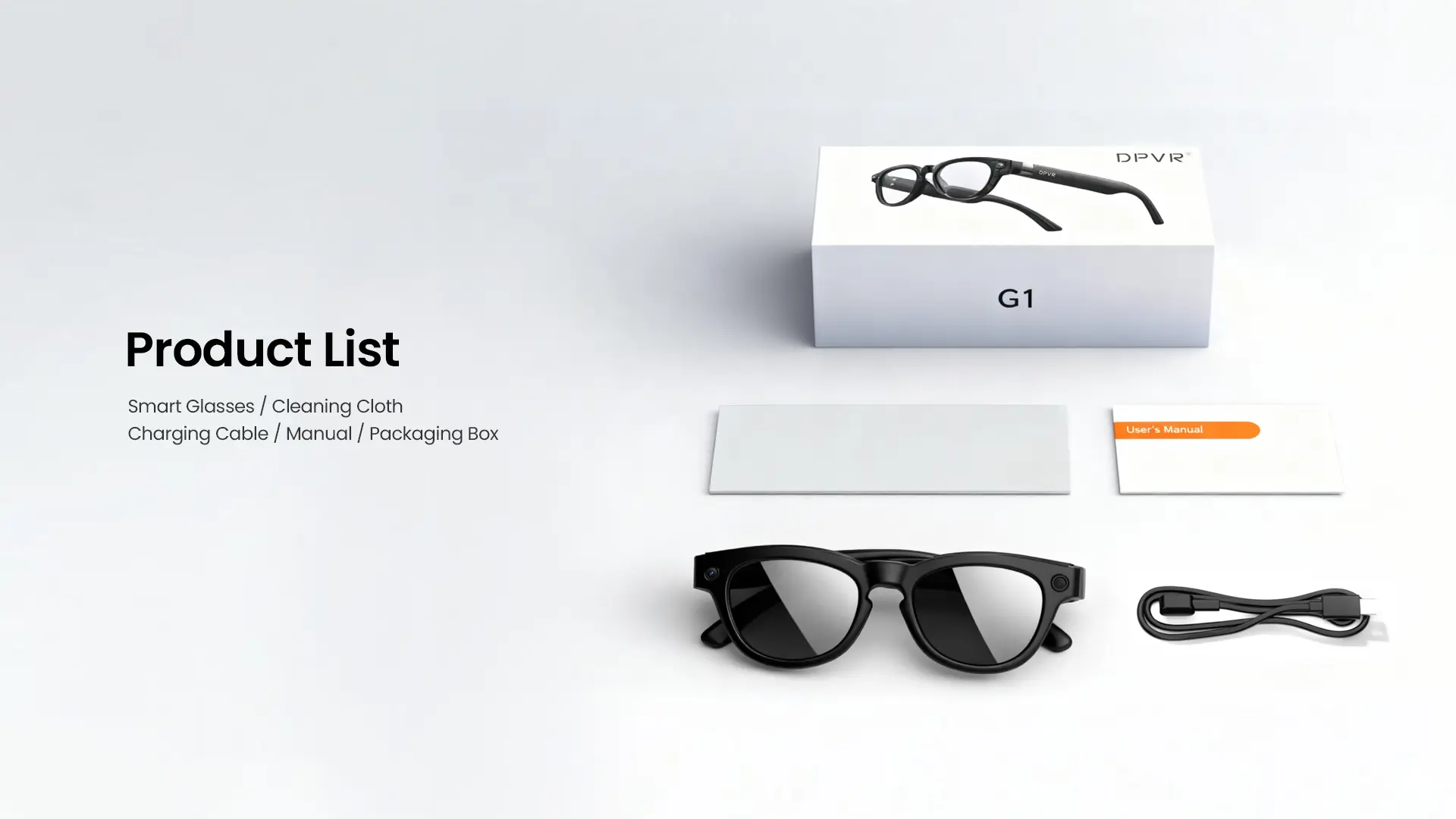
Inside the box, you will find the G1 smart glasses, a charging cable, a cleaning cloth, and the user manual.
Setting Up
It’s crucial to understand that the DPVR G1 smart glasses are not an independent device; many of their features can only be accessed through the companion app known as “HeyCyan”. Therefore, you will need to download and install this application from either Google Play or the Apple App Store.
After completing the installation, you must follow the prompts in the “HeyCyan” app on your phone. This will guide you through the process of connecting the G1 glasses to your phone by searching for the device. Once the connection is established, the glasses will emit a ‘ding’ sound. This procedure is quite straightforward, and your glasses should be ready for use within ten to fifteen minutes of unboxing them.
Build Quality
When considering a product designed to be a more budget-friendly alternative to what’s currently on the market, certain decisions must be made to achieve that lower price point. Nevertheless, I was pleasantly surprised by the quality of materials used in the DPVR G1’s. While they may not reach the standard of Meta’s RayBans—after all, RayBans are premium eyewear—I believe the plastics and overall build quality are impressive for the $89.99 price tag.
As a pair of glasses, they are both lightweight and comfortable to wear. I initially had concerns about the design around the bridge of the glasses, as it seemed like it might pinch the noses that aren’t slim. However, every time I’ve worn them, they’ve proven to be comfortable throughout the entire duration.
The glasses come equipped with a 290mAh battery located in one of the arms of the frames, which can be fully charged in approximately ninety minutes. The opposite arm of the glasses is evenly weighted, ensuring that they feel balanced while being worn
Key Features
The main features highlighted by the team for their G1 model include:
– An 8MP camera designed for capturing both photos and videos
– Integrated speakers that are ideal for media playback and phone calls
– A built-in microphone for recording videos, handling calls and using the AI assistant
– An AI assistant with photo recognition capabilities
– Real-time AI translation supporting over 24 languages
– A battery that provides up to twelve hours of music playback or eight hours of talk time.

Testing The Product
In this review, I aimed to take the time to explore the main features highlighted by the team as essential. This was to understand the limitations associated with the lower price point and the use of a third-party AI that several budget AI smart glasses utilise.
The photos captured with the DPVR G1s do a fair job of representing colour depth, but they won’t offer the highest quality. You may need to use photo editing software to enhance them if you plan to share online on social media. However, they are sufficient for capturing personal memories without any edits. That said, due to the camera quality and limitations of smart glasses, you may notice colour smearing and blurriness in finer details.
Regarding video recording, the website claims that the glasses come with an anti-shake chip. However, during my tests while recording short clips on a walk in the local park, the anti-shake feature didn’t perform as expected. Therefore, if you’re considering these glasses for activities like bike riding (as suggested on the website), they may not be the best option. Nonetheless, the overall video quality is adequate for capturing brief clips and moments for social media or personal use, although some colour grading might be necessary since colours can appear somewhat washed out, despite their claims of capturing ultra-clear visuals with true-to-life colours.
Additionally, it’s important to note a significant warning regarding battery life. Utilising the photo and video features drains the battery much faster. I found that they lasted only two to two and a half hours before dropping to fifteen percent battery, at which point the glasses automatically disable these features.
Now let’s discuss the AI features and how “HeyCyan” operates within these glasses. Honestly, I found this app to be quite user-friendly, and it serves not only as your AI assistant for the glasses but also allows functions like translation to be utilised without needing the glasses connected. Throughout my experience with the glasses, I noticed some limitations in their performance as an AI assistant, particularly in photo recognition and real-time translations, especially when compared to what Meta AI offers. The primary concern is that the AI activation (saying Hey Cyan) can be somewhat unreliable, and the responses to inquiries and translations may be sluggish.
Lastly, the glasses come equipped with speakers and a microphone. As expected for this price range, the speaker quality isn’t top-notch, but they are good for the cost, albeit a bit tinny. These are open-ear speakers, so privacy can be an issue if you crank up the volume, which is something to consider if you’re listening to music or taking calls in public. Regarding the microphone, similar to the speakers, you shouldn’t anticipate the highest quality given the price, but it performs adequately. However, the noise cancellation leaves much to be desired in busy environments. During a phone call, the person on the other end could clearly hear the sounds of traffic and cars passing by as I walked, but they still mentioned that I was coming through clearly enough to maintain the conversation.
Verdict
The DPVR G1 smart glasses impressively provide a surprisingly effective experience for their budget-friendly price of $89.99. Although they may not compete with the premium materials, camera quality, or AI capabilities of higher-end models, the build quality is robust, and the glasses are both lightweight and comfortable. The essential features—like the camera, speakers, and AI assistant—are sufficiently functional for casual daily use. The quality of photos and videos is decent for capturing personal memories rather than producing professional-grade content, and the AI functionalities can be hit or miss, sometimes exhibiting slower responses and unreliable activation. Additionally, battery life tends to diminish significantly when the camera is in use. Nevertheless, given the price point, the G1 represents a commendable entry into the realm of AI smart glasses, making them an appealing choice for those interested in the technology without wanting to spend on a pricier option.
Advertisment

Advertisment
Advertisment

Advertisment

Advertisment
Copyright / Virtual Grip (formally The VR Realm) / 2016 -