
Listen to The VRverse Podcast

Advertisement

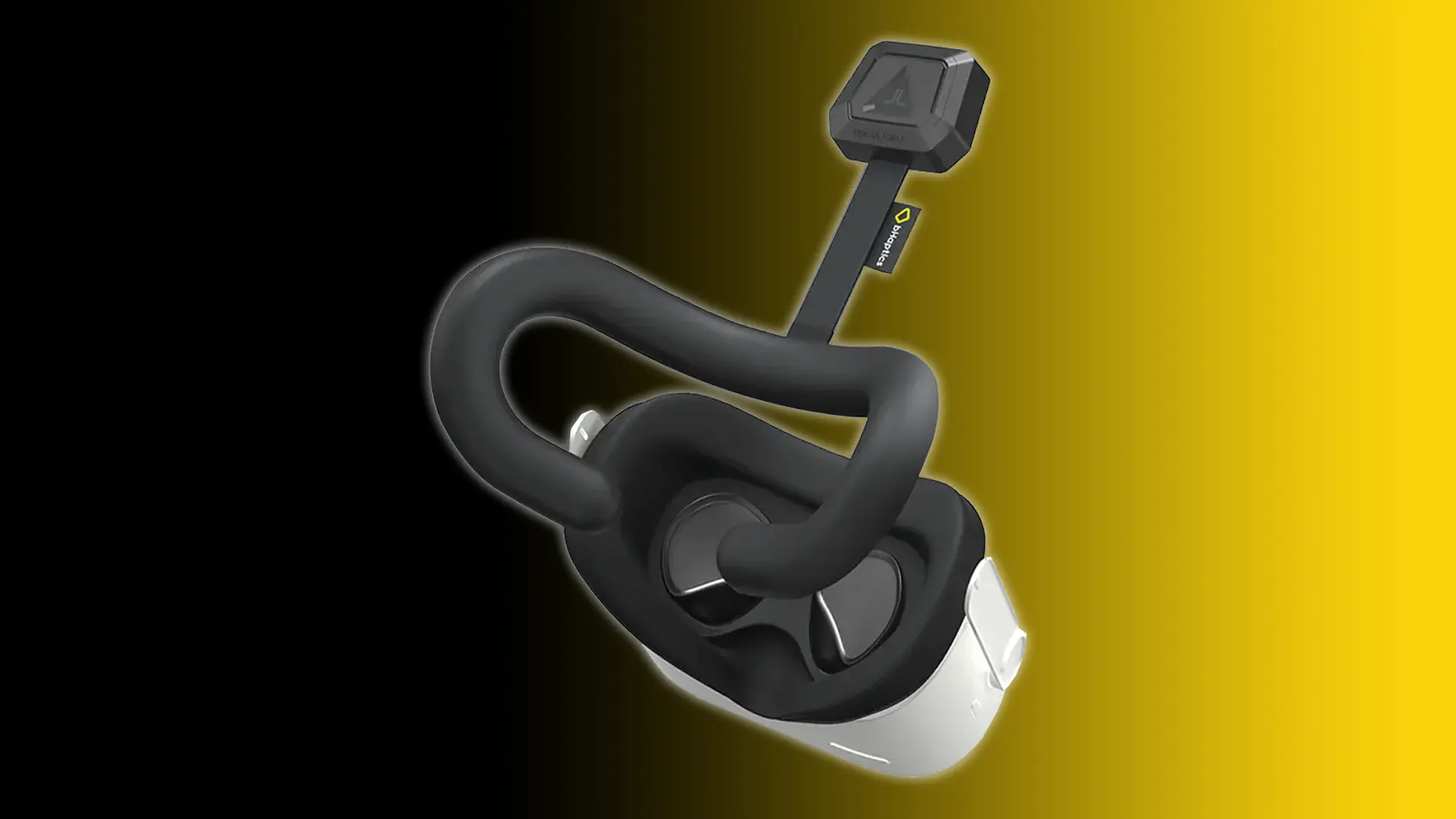
Review: bHaptics TactVisor
- August 25, 2025
- 3:28 pm
fter exploring the bHaptics FPS Bundle and the TactSuit Air, I was ready to add the TactVisor and put it to the test. What excites me about this is the ability to integrate headset haptics for PC VR and Meta Quest. Initially, I was sceptical about the PSVR2’s headset haptics, thinking it might just be a gimmick that would lose its appeal quickly, similar to the finger tracking on the Index Controllers – but to my astonishment, it has turned out to be a feature that truly distinguishes that headset from its rivals

Game Details
Release Date: February 3rd 2026
Developer: Gaijin Entertainment
Publisher: Gaijin Network Ltd
Price: £24.99 / US $29.99
Reviewed On: PlayStation VR2
* Access Provided For Review *
What's In The Box
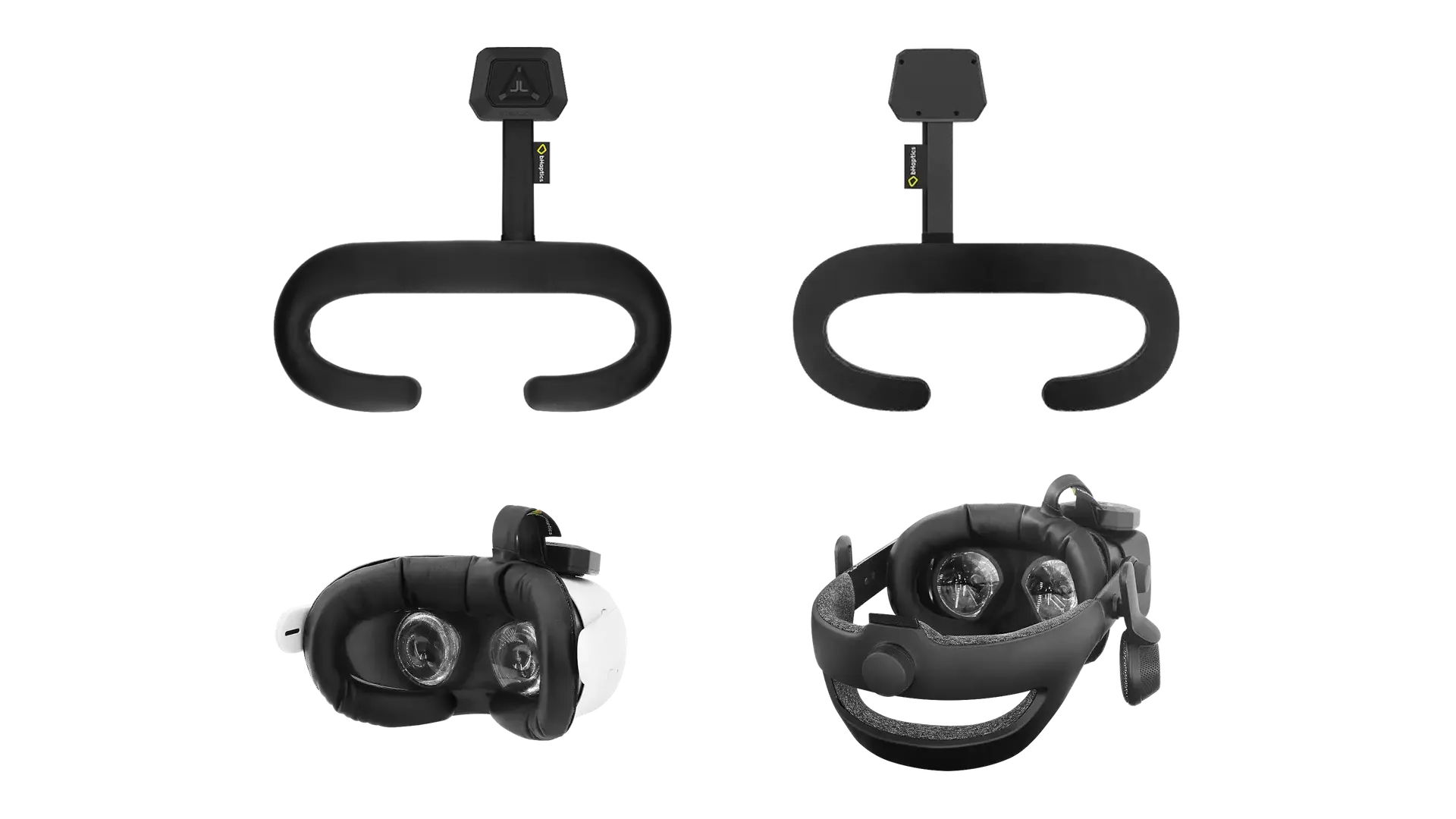
Inside the box, you will find the TactVisor, 4x Velcro Stickers, a USB Type C charging cable and User Manual
Quality and Comfort
Every bHaptics product I’ve owned and tested has consistently impressed me with its quality; this is an area where bHaptics truly excels. I’m pleased to say that the TactVisor is no exception. The materials used are of exceptional quality, the battery is firmly attached, and there is a robust material safeguarding the wires connecting the battery to the face pad. Once more, the overall quality of the face pad and Velcro stickers gives the impression that they are designed for durability.
Initially, I was concerned about the TactVisor comfort due to the four ERM motors located within the face pad. I worried that this might lead to discomfort, especially since I prefer to tighten the headset as much as possible against my face. Given this, I wondered if I would feel the motors pressing into my skin. However, I am pleased to report that during both short and long testing sessions, I did not feel them at all against my face.
Another concern was whether the headset would feel less balanced due to the added weight of the battery pack that powers the haptic motors. Nevertheless, it only adds 63 grams, which is minimal when attached to the headset. With the KIWI design headstrap I use, it feels just as comfortable and balanced as it does without it.

Immersion and Benefit
As previously mentioned, I have been captivated by the headset haptics on PSVR2, which I consider a standout feature of the product. This is due to the fact that haptics play a crucial role in enhancing the immersion of virtual reality, a concept that bHaptics has recognised and has been delivering for quite some time – including the TactVisor, which was available even before Sony incorporated headset haptics into the PlayStation VR2. This insight has enabled them to continuously improve their haptic products over the years.
This long-standing presence has enabled the team to successfully create an extensive library of one hundred eighty-one supported titles across PC VR and Meta Quest. PC VR provides the most extensive support through both native and mod options, while Meta Quest’s support, although slightly less, relies solely on native capabilities. Each title I tested on both platforms makes effective use of the TactVisor, significantly enhancing the gaming experience, especially when your head is struck. For example, in certain shooter games, if you get hit on the side of the head, it activates the sensor in that specific area of the TactVisor, adding an extra layer of immersion.
In addition to the games that are either natively supported or modded for PC VR, the TactVisor provides an Audio to Haptics mode for PC VR. This feature enables audio to be converted into haptic feedback on the TactVisor. However, you will need to modify the feedback intensity based on the game if you wish to utilise this option.
Advertisement

Advertisement
In this review, I aimed to evaluate the TactVisor on all platforms that it natively supports, while also exploring the Audio to Haptics feature and the mods available for PC VR. To ensure a thorough assessment, I tested various games spanning a range of genres across the platforms
Steam VR
The TactVisor boasts an extensive library of one-hundred and twenty-eight games, featuring both native and mod support for PC VR. During my testing with PC VR, I exclusively used Steam VR, even though there are several titles available with native support on the Meta PC Store.
Set-Up
Setting up PC VR is quite straightforward. First, you need to attach the TactVisor to your headset. It’s crucial to ensure that your headset’s base face gasket supports interchangeable face pads using Velcro; if it doesn’t, you’ll need to buy a third-party gasket that allows the TactVisor to be attached with Velcro. If it does support this, I suggest completely removing the face gasket, taking off the current face pad, and then attaching the TactVisor before reattaching the face gasket to the headset. Once this is secured, find the optimal position for the Velcro sticker, apply the sticker, and connect the battery pack to it.
Next, download and install the bHaptics Player on your PC. When you launch the player, it will walk you through the steps to pair your devices via a Bluetooth connection – you can use either the internal Bluetooth or a Bluetooth dongle. After everything is paired successfully, you are ready to start.
Native
During my testing of PC VR games, I explored titles such as Arizona Sunshine Remake, Hubris, Audio Trip, Sniper Elite VR, Paint The Town Red, and Propagation Paradise Hotel. In Arizona Sunshine Remake, Sniper Elite VR, and Paint The Town Red, the mechanics function as expected, signalling when you’ve sustained head damage. Audio Trip incorporates headset haptics that activate when your head collides with incoming walls. Propagation Paradise Hotel employs this feature for head impacts as well, and it also triggers when you apply first aid spray to your face. Throughout my experience with various bHaptics products, Hubris has consistently amazed me with its support, with the TactVisor offering directional damage feedback and simulating the sensation of water brushing against your face while swimming. The inclusion of these features in the games significantly enhances the overall immersion.
Mods
When it comes to modifying games for bHaptics compatibility, each title provides instructions within the bHaptics Player, which includes links to download the necessary files and guidance on how to install the mods.
I experimented with mods for Resident Evil VII, Half-Life: Alyx, Far Cry VR, Compound, and Beat Saber. Both Resident Evil VII and Far Cry VR require a mod to enable virtual reality functionality, and as previously mentioned, the bHaptics Player supplies all the essential details. In these mods, the TactVisor is utilised to replicate the sensation of taking damage to your head. Similarly, to Audio Trip, Beat Saber employs headset haptics to create feedback when you hit walls in the game. Half-Life: Alyx enhances the experience by simulating head damage, making encounters with Headcrabs significantly more immersive. The Compound mod is exceptionally well-executed, with the headset providing subtle feedback when firing weapons, picking up items, and collecting health boosts, while the visor delivers stronger vibrations upon receiving a headshot. Once again, the modders who integrate support for bHaptics products excel at enhancing immersion, and the support for the TactVisor achieves just that.
Audio To Haptics
The Audio to Haptics feature for the TactVisor is somewhat inconsistent when compared to the TactSuit and TactSleeves, as a steady vibration on your face doesn’t always yield the best results. I tried this functionality with Le Mans Ultimate, Alien Rogue Incursion, Lone Echo, Spin Rhythm XD, and Halo VR. In each of these games, I found it necessary to lower the feedback intensity and in game volume settings, which the later sometimes made the vest’s Audio to Haptics feel less impactful. Among all the games I tested, I discovered that Le Mans Ultimate was the only one where the Audio to Haptics felt appropriate, especially when I dialled down the feedback intensity to achieve a very subtle vibration on my face while driving. The other titles were less effective; for instance, Lone Echo was enjoyable for navigating in zero gravity, but the abundance of dialogue made it a bit overwhelming.
Based on my experience with the TactVisor, I believe that in most situations, players would prefer to engage without having the TactVisor connected if using Audio to Haptics.

Advertisement

Advertisement
Meta Quest
Next, testing was conducted on Meta Quest, which provides native support for an impressive one hundred and one games. A number which is quite close to the total games supported on PC VR.
Set-Up
Setting it up again is quite straightforward. First, you need to attach the TactVisor to your headset. It’s crucial to ensure that your headset’s base face gasket supports interchangeable face pads using Velcro; if it doesn’t, you’ll need to buy a third-party gasket that allows the TactVisor to be attached with Velcro. If it does support this, I suggest completely removing the face gasket, taking off the current face pad, then attaching the TactVisor, and finally reattaching the face gasket to the headset. Once everything is in place, find the optimal position for the Velcro sticker, apply the sticker, and connect the battery pack to the Velcro.
Next, download the bHaptics Player App from the Meta Quest Store. After that, connect the TactVisor via the Bluetooth settings on the Quest. Open the bHaptics Player App, and it will indicate that the devices are successfully paired. You are now ready to enjoy games that are natively supported.
Native
The native games I chose to test on the Meta Quest included Sniper Elite VR: Winter Warrior, Espire 2, The Phoenix Gene, Synth Riders, and ARK and ADE. In Sniper Elite VR, Espire 2, and ARK and ADE, the technology was employed to replicate headshot experiences, with ARK and ADE providing directional impact feedback. Synth Riders, like other rhythm games, also utilised this feature to mimic the sensation of your head colliding with incoming walls. Lastly, The Phoenix Gene leveraged the visor to recreate the feeling of your head striking barriers and parts of the environment as you navigate through the levels. Overall, these games are making use of the TactVisor to enhance immersion by simulating damage or impacts to the head in the titles I have tried.
Audio To Haptics
The Meta Quest does not enable Audio to Haptics functionality for the TactVisor. This limitation arises because Audio to Haptics is managed by connecting the vest to the headset’s audio jack, which means it only converts audio for the vest and not for any other bHaptics devices.

Advertisement
Advertisement
PlayStation VR2
Finally, I chose to try it out on one of the games that has native support on other platforms, which does not utilise the headset haptics for PlayStation VR2. The game I selected was Synth Riders, and it successfully incorporated haptics when colliding with walls, similar to its performance on PC VR and Meta Quest. However, the other PSVR2 titles I own that already integrate headset haptics on the PlayStation VR2 and support TactVisor across on the other platforms, lacked any functionality whatsoever. This is understandable since the team is already utilising the haptics of the PSVR2 headset.
This implies that the only genuine application might be for games that do not utilise the PSVR2 headset haptics feature (which are quite few) to potentially receive support. This would be the sole benefit, as, like the Meta Quest, it lacks Audio to Haptics support—only the TactSuit offers that feature on this platform. Also, to use the TactVisor with PSVR2, you must acquire a third-party facial interface that comes with interchangeable Velcro face pads. During my testing, I used AODELAN’s VR Face Pad designed for PlayStation VR2.
Verdict
As previously mentioned, one standout feature of the PlayStation VR2 is Sony’s choice to incorporate headset haptics, a feature I have grown to appreciate. The bHaptics TactVisor allows you to extend this capability to both PC VR and Meta Quest devices, which they have provided for a considerable time. During my testing of the TactVisor across a variety of supported games on these platforms, along with features like directional feedback and the customisable intensity options available in the bHaptics Player, I believe it actually surpasses what Sony’s PSVR2 can deliver. My initial concerns about the added weight of the headset and the discomfort from the ERM motors pressing against my face vanished as soon as I donned the headset and began my tests; the face pad is excellent and comfortable for both short and extended sessions – and it can remain on the headset even when not in use. Unlike the bHaptics TactSuit and TactSleeves, it’s not particularly effective for most Audio to Haptics experiences on PC VR, but with a vast library of both natively supported and mod-supported titles, there is still a lot to explore. The TactVisor is undoubtedly a fantastic addition to the TactSuit and/or TactSleeve setup, enhancing the immersion in virtual reality, or even if you simply want to add headset haptics to PC VR or Meta Quest. With bHaptics demonstrating their awareness of the significance of tactile feedback in virtual reality with each product they launch, you will not be disappointed by the enhancements the TactVisor brings to the games you own.
Copyright / Virtual Grip (formally The VR Realm) / 2016 -
